<img height="1" width="1" style="display:none" src="https://www.facebook.com/tr?id=3248926035247507&amp;ev=PageView&amp;noscript=1">

Online Education Faculty Resources

Welcome! This site provides resources to support distance education faculty. Click the links in the left navigation menu to find what you are looking for.

Need help for a student? Share the Student Access Quick Guide.

Online Student Attendence

Faculty often wonder what defines “attendance” in an online class, especially in relation to reporting on census or attendance verification rosters. The Federal Student Aid Handbook outlines online attendance for higher education institutions.

An excerpt from pages 5-65 and 5-66 of Volume 5, Chapter 2 of the 2020-2021 Federal Student Aid Handbook appears below and provides suggested parameters. Be sure to visit the Federal Student Aid Handbook website linked above for the most recent year and edition.

Documenting Attendance in Distance Education Courses

“In a distance education context, documenting that a student has logged into an online class is not sufficient, by itself, to demonstrate academic attendance by the student. A school must demonstrate that a student participated in class or was otherwise engaged in an academically related activity.

Examples of acceptable evidence of academic attendance and attendance at an academically related activity in a distance education program include:

  • student submission of an academic assignment,
  • student submission of an exam,
  • documented student participation in an interactive tutorial or computer-assisted instruction,
  • a posting by the student showing the student’s participation in an online study group that is assigned by the institution,
  • a posting by the student in a discussion forum showing the student’s participation in an online discussion about academic matters, and
  • an email from the student or other documentation showing that the student initiated contact with a faculty member to ask a question about the academic subject studied in the course.”
Some examples might include a
  • syllabus quiz or other course related assessment
  • student bio or introduction discussion forum (Wanna get fancy? Use Flipgrid! )
  • short written assignment where students submit a few sentences of written text, a video, etc. about their goals, what they want to learn in the class, fears, etc.

Have other examples to share? Email your Distance Education Coordinator Jennifer Fowler at jfowler@peralta.edu to add it to this page!

Equity in Online Education

What is equity in online education?
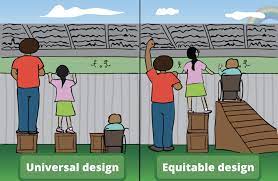
Equitable

Achieving institutional equity is essential to student learning. To facilitate this process, equity-minded educators must deepen our commitment to providing supportive online learning environment that is based upon equity principles and high-impact practices to address disparities, close achievement gaps, and meet the needs of each student.

Among its definitions, Merriam-Webster (n.d.) defines equity as “freedom from bias or favoritism.” In the Distance Education context, Peralta uses the term equity to mean “freedom from bias or assumptions that negatively impact online learners’ motivations, opportunities, or accomplishments.”

Unfortunately, there are clear achievement gaps for certain student populations in online courses, which means every online teacher has to be proactive in addressing challenges and barriers that affect the success of those student groups. Those challenges and barriers can be as fundamental as access—making sure all students have access to online courses and the technology required to complete them. Conversely, they can be as complex as helping students combat stereotype threat or increasing their feelings of social belonging in an online course environment.

NOTE: The California Community Colleges’ California Virtual Campus-Online Education Initiative (CVC-OEI) has created a Student Equity Work Group that is charged with the following tasks:


  • examining the institutional, systemic and learning barriers that result in inequitable outcomes and disparate impact in course and degree completion rates in online education,
  • identifying disparities and challenges associated with online student equity, and
  • identifying success strategies to address these inequities as it relates to course and degree completion.

Who faces equity challenges?

Studies comparing performance in face-to-face and online courses (Jaggars, 2014) found that the following groups have a higher risk of not completing or passing online courses:

  • Males
  • First-generation students
  • Low-income students
  • Ethnic minority students (specifically Latinx and African-American)
  • Academically underprepared students

The four Peralta Colleges include the following additional groups in their Student Equity Plans that address equity in all classes—not just online classes:

    • Foster youth
    • Students with disabilities
    • Military veterans

What equity factors affect success?

A wide range of factors affect student success, many of which can be improved by taking steps to improve equity:

    • Academic factors: Generally, students’ level of preparedness for learning (e.g., currently having ineffective study or learning skills which can be improved) and, specifically, students’ readiness for online learning affect their success.
    • Pedagogical factors: Your course organization and design, the quality and quantity of interaction opportunities, and timely and effective feedback all contribute to success.
    • Psychological factors: Students’ feelings of social belonging and ability to address stereotype threat improve success, as do students’ perceptions of the course’s value relevance and the teacher’s compassion.
    • Social factors: Students’ feelings of isolation or alienation in an online course have a negative impact, while joining a learning community has a positive impact.
    • Technological factors: Access to and ability to use the technologies required for online course—or lack thereof—affect students’ success.

How can you increase equity?

Here are a few ways you can increase equity in your online and/or hybrid course:

    • Identify and address unconscious bias – Whether we are aware of it or not, our behavior as teachers is affected by unconscious attitudes, stereotypes, assumptions and biases. For example, “instructors may assume that students know to seek help when they are struggling” (Yale CTL, n.d.).
    • Identify and address image and representation bias – Our students’ perceptions are influenced by the images they see. As teachers, we rarely think about how the images in our textbooks, presentations, course materials, and other Web resources might show unequal representation (e.g., gender, ethnicity, age); and/or promote stereotypes (Kay, Matuszek & Munson, 2015). For example, textbooks may underrepresent women and certain ethnicities in images of people in prestigious professions or leadership positions.
    • Create inclusive course environments and activities – If we’re not careful, online and hybrid courses have the potential to exclude different types learners from participating. Learners with disabilities are one of the most notable groups, but not the only one by any means! There are a wide range of inclusion strategies to change this dynamic.
    • Increase personal connection with students – Increasing your personal connection with students is critical in an online or hybrid course. Alienation and isolation are real factors that drive students to drop out of or stop participating in online courses. Conversely, a higher sense of connection with the instructor leads to higher retention and success (CCCCO, 2013).
    • Use clear language, goals and measures – It’s easy to think we’re being clear, but first generation college students don’t work from the same set of assumptions about completing work for college courses–especially online courses. USC’s Center for Urban Education (n.d.) shared five principles to achieve equity. The first principle outlines the need to use clear language, goals and measures.
    • Refer students to support and resources – Student success is a team effort—it goes beyond any one course or teacher. In addition to setting up your course to foster success, point students to resources relevant to them. The Student Resources Site provides many  links to relevant support for online students.

You’ll read more about these strategies and others as you complete this module. It’s worth noting that the CVC-OEI Online Equity Framework suggests that there are three aspects to increasing equity:

    • Instruction and course design: Equity-minded online courses
    • Student services: Equitable access and support for students
    • Institution: Institutional policies and practices that promote equity

More Resources: 

Sign up for the Online Equity Training offered at PCCD.

Getting Started with Canvas

Need to get up and running with Canvas quickly?

                          fb-stopwatch2-600x315

View Canvas videos guides or read the Canvas Instructor Guides for help getting up and running with Canvas.

If you learn best by reading instead of watching and listening to videos, check out the ABC’s of Course and Design and Intro to Teaching with Canvas self-paced courses.

Regular, Effective Contact

Regulations

Click to view the text of title 5

“Regular and substantive” (ACCJC) and/or “regular and effective” (Title 5) instructor-student interaction is required in all distance education courses. Research has shown that online courses with high levels of social interaction have a positive impact on learning.

Click the links below to familiarize yourself with regulations about regular effective contact in online courses. You will also find examples and practices for incorporating regular effective and/or substantive contact in your course.

Title 5 

    • Title 5, § 55204, Instructor Contact of California Education Code requires distance education courses to have regular effective contact between instructor and students, and among students*.”
    • *Please Note: In Spring 2019, Title 5 was amended to include the phrase “among students” to require student-student interaction in addition to instructor-student interaction. Review this resource to learn more about this update to Title 5.

ACCJC

Federal Regulations

ASCCC

The Peralta Community College District Distance Education Plan provides recommendations for acheiving instructor-student interaction that is “regular and substantive” (ACCJC) and/or “regular and effective” (Title 5). Based on an analysis of accreditation audits, WCET identified four criteria for what constitutes “regular and substantive interaction” (Poulin & Davis, 2016):

  • Interaction must be initiated by the instructor. While this is not in the definition, it was highlighted in college audits by the Office of Inspector General.
  • Interaction must be “regular” and …somewhat frequent. This is interpreted as repeated instances at specific intervals (e.g., once a week, twice a month) or conducted in the same way (via email, LMS announcements, LMS forums).
  • Interaction must be “substantive” or of an academic nature. This is interpreted as activities that “further learning or assessment of learning”(Poulin & Davis, 2016, para. 22).
  • Interaction must be with an instructor that meets accrediting agency standards.

Examples

Below you will find examples of instructor-student and student-student interaction. You do not need to incorporate all the examples below. They are intended as a suggested guide and may vary based on discipline, pedagogical approach, or instructional design:

    • Welcome email or video
    • First day or week of course check-in assignment
      • Examples: a self- introduction discussion forum, syllabus or classroom code of conduct quiz, icebreaker activity, internet scavenger hunt, etc.
      • A first day or week check-in assignment also helps determine online student attendance for census and attendance verification roster reporting
    • Video conferencing via Zoom
      • Examples: use for ongoing live office hours, exam review sessions, lectures, student oral presentations, student group projects, guest speakers, virtual field trips, etc.
    • Customized front page
      • Use a Front Page to post engaging content and important information about your course
        • Some faculty update or modify aspects of their homepage weekly to coincide with the topic or unit in the course
    • Discussion boards
      • Instructor moderated discussion forum assignments
        • Equity Tip: Consider creating a system to track which students you respond to in the forum each week to ensure every student gets at least one response from you throughout the term. You can create an Excel spreadsheet to track responses or divide your roster into groups (i.e. alphabetical by last name– group #1 is A-F, group #2 is G-L, etc.) and respond to each group in intervals
      • Q&A board where instructors or fellow students answer questions
      • A student “chat cafe” or informal discussion board for students to connect with each other
    • Announcements
      • Create regular writtenaudio, or video announcements in Canvas
      • Can be used to preview, summarize, or clarify course content
      • Post announcements with links to relevant articles or videos about course content
    • Individual contact with students via e-mail, phone, or video
    • Facilitating student to student contact
      • Learn how to create groups in Canvas for small group projects, assignments, or presentations
      • Create peer review assignments in Canvas
      • Use Zoom to facilitate live group projects, study sessions, or presentations
      • Use Canvas LTIs or apps to allow students to work and create connection with each other
    • Timely and individualized feedback on student work

Note: If you are using a publisher 3rd party website that only allows for automatically graded assignments, this should be supplemented with assignments in Canvas that allow you to give individualized, thorough feedback. When possible, course activity and interaction should be kept in Canvas for documentation.

Email Distance Education Coordinator Richard Kaeser at rkaeser@peralta.edu to add additional examples and best practices to this list.

Accessibility

Regulations

There are two major pieces of legislation in California that provide a mandate for designing courses that are accessible to students with visual, auditory, and physical impairments, as well as students with information processing differences:

Support Resources


Quick Tips

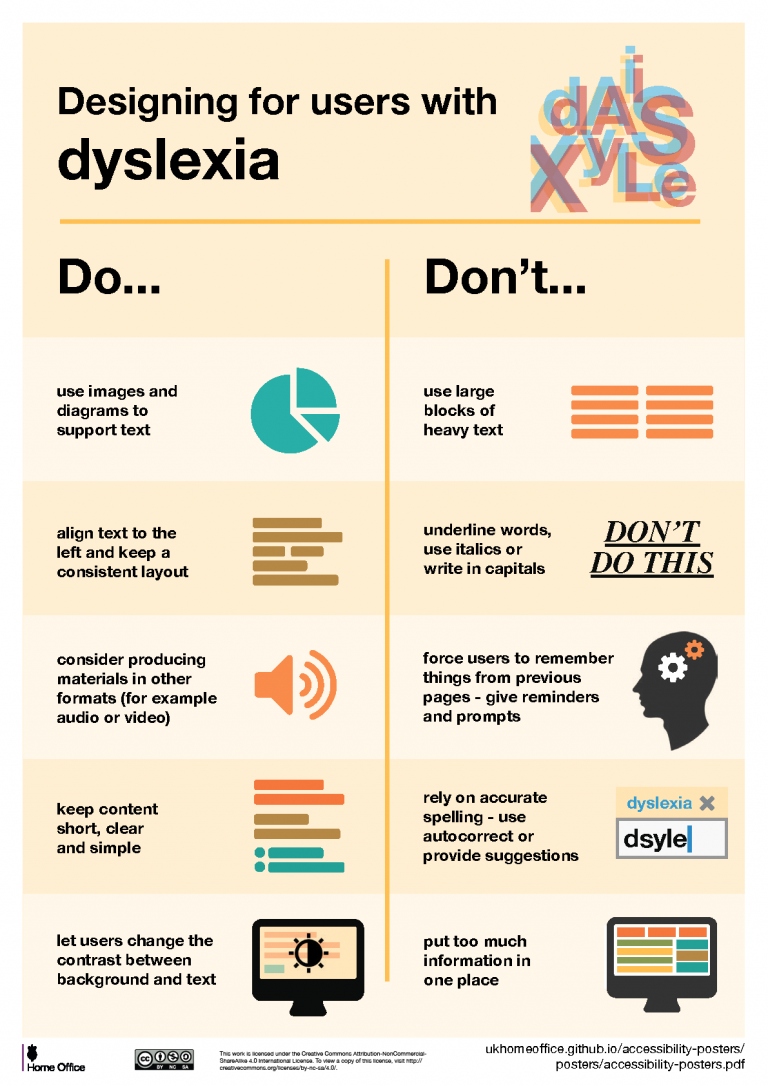
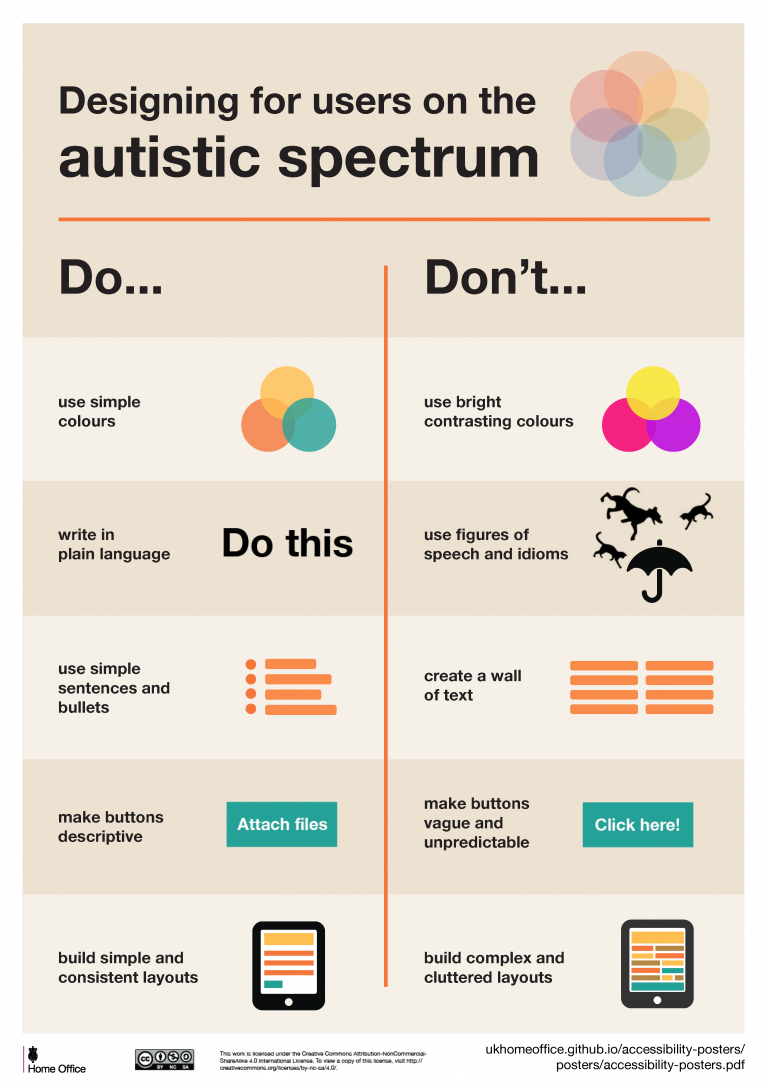
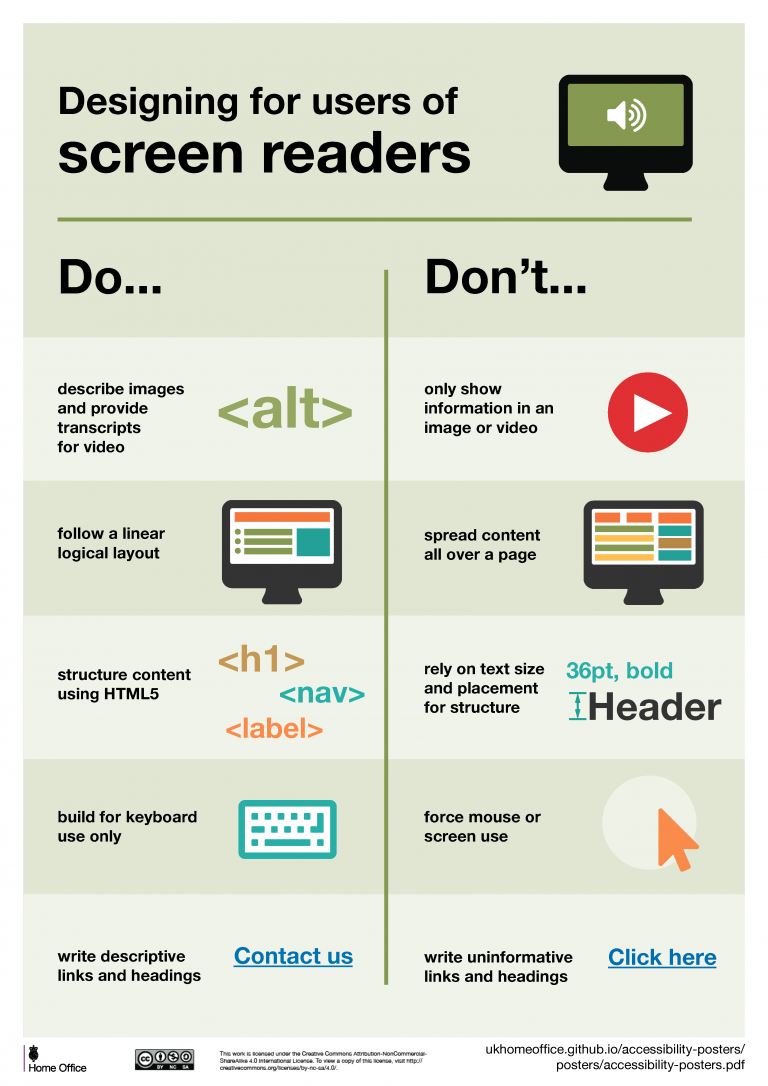
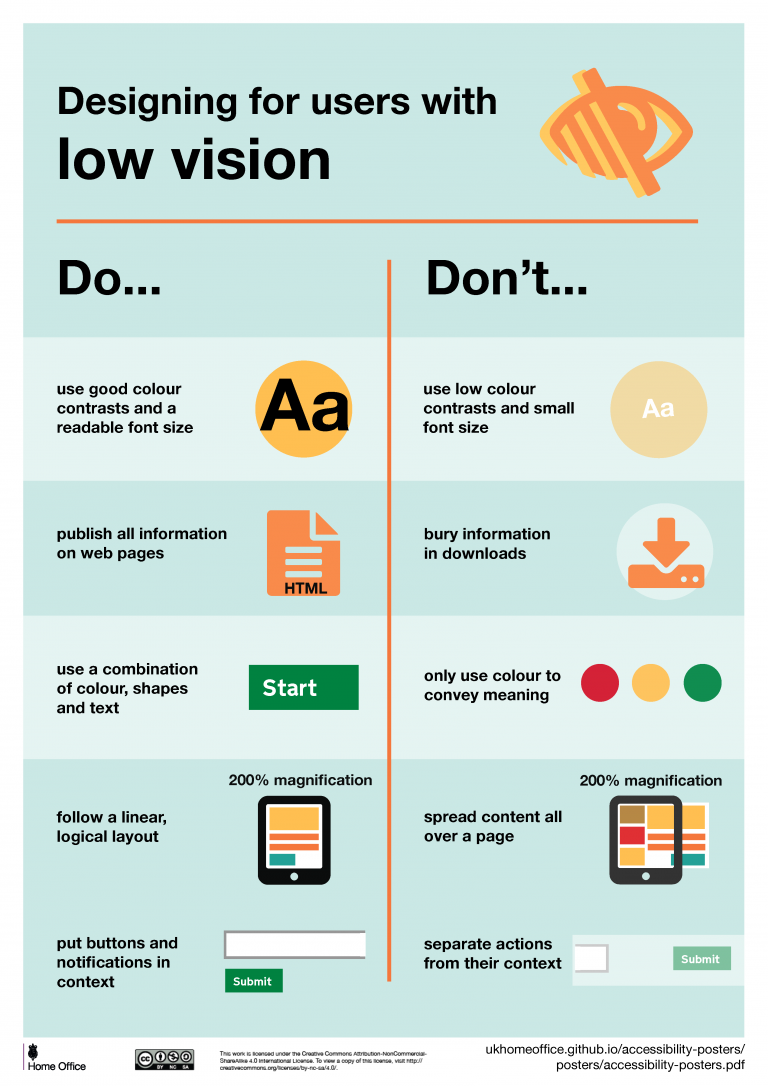
Scroll through the images below for general suggestions and practices for making online content more inclusive and accessible for all students.
accessibility-posters-set_Page_3-768x1086-1

accessibility-posters-set_Page_4-768x1086-1

accessibility-posters-set_Page_5-768x1086-1

accessibility-posters-set_Page_2-768x1086-1


Canvas LTIs

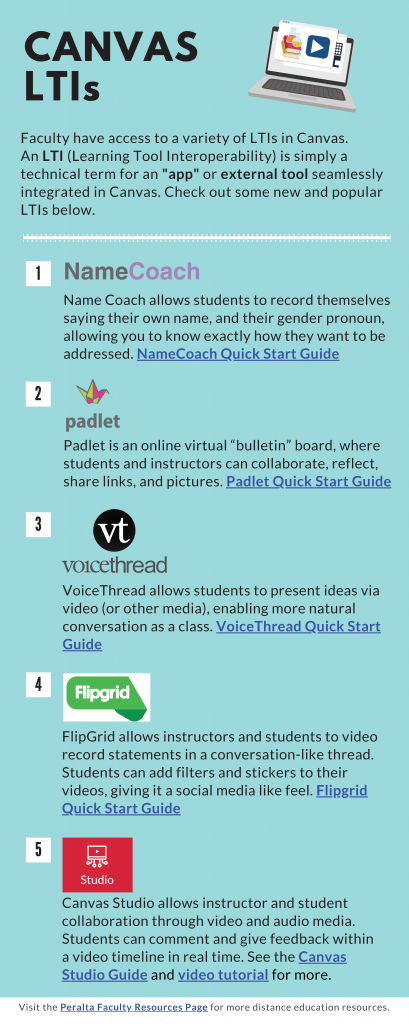
Looking to add new LTI’s or apps in Canvas? Check out the infographic below which you can also download here to access the hyperlinks.

Check out the LTI section of the Peralta Faculty Resources page for a full list of LTI tutorials and resources
Canvas-LTIs-409x1024-1


Newsletter

The distance education newsletter is published to keep faculty informed about distance education events, teaching tools, updates, and professional development opportunities.


Past newsletters are archived in OneDrive Here

Helpful Links

Faculty Logins

Peralta Portal

Login to the Peralta Portal for faculty access to Canvas, Outlook Email, and other Microsoft apps.

Peralta Help Desk

Submit a ticket to get Canvas, IT, and other technical issues resolved.

Campus Solutions

Access to class rosters, human resources data, and more. 

CurriQunet

Curriculum system for accessing, updating, and creating course outlines of record.

Other Resources

PCCD Distance Education Website

Peralta’s District Distance Education website.

PCCD Distance Ed Plan

Peralta Community College District’s Distance Education Plan and goals for 2017-2020.

PCCD Equity Rubric

Peralta Community College District’s evaluation instrument designed to help online teachers make the course experience more equitable for all students.

AP 4105

Peralta Community College District’s Administrative Procedure on scheduling of distance Education Courses.


Title 5, California Code of Regulations pertaining to distance education.

Legal Opinion: Students & Webcams

Legal Opinion from the California Community College (CCC) Chancellor’s Office about live synchronous online classes and Students & Webcams

Legal Opinion: Real-Time Captioning

Legal Opinion from the California Community College (CCC) Chancellor’s Office about live synchronous online classes and real-time captioning.

@ONE Online Network of Educators

Free/low cost distance education training funded by the California Community College (CCC) Chancellor’s Office.


A collaborative effort among CCCs to ensure significantly more students complete their educational goals by increasing both access to and success in high-quality online courses.

OEI Course Design Rubric

Rubric for the CVC-OEI that encourages effective online course design, interaction and collaboration, assessment, learner support, and accessibility.

Zoom

Free platform for video conferencing.


Faculty Logins

Call 1-844-592-2199


24-hour Canvas phone support.

Canvas Teacher App

Manage certain aspects of your course, communicate with students, and grade assignments from a mobile device. 

Canvas Instructor Guide

Frequently asked questions and answers about how to use Canvas.

Canvas Video Guide

Short video tutorials on how to use Canvas.

Sample Canvas Courses

Sample Canvas shells from a variety of disciplines.

Canvas Webinars

Free Canvas training webinars.


Useful information about Canvas processes and procedures for Peralta faculty. 


Useful information about Canvas processes and procedures for Peralta students.

Accessibility

Accessibility in Canvas

Learn how to leverage Canvas’ tools to build an accessible and usable learning environment.

PDF Accessibility

Learn how to determine if your PDF files are accessible, and potential resources and strategies for delivering accessible electronic documents.

PowerPoint Accessibility

Learn the essential elements needed to create an accessible PowerPoint, the basics of PowerPoint’s accessibility tools, and how to test if a PowerPoint is inaccessible.

Microsoft Word Accessibility

Learn the essential elements needed to create an accessible Microsoft Word document, the basics of Word’s accessibility tools, and how to test if a Word document is inaccessible.


Learn different captioning strategies, effective pre-production lesson planning for videos, and the basics of audio description.